Neovim from scratch / part 7
Rebuilding my Neovim config from scratch (Part 7: The comfort layer, and what 67ms taught me)
The finale of rebuilding my Neovim config from zero: fuzzy finder, file tree, git signs, statusline, which-key, plus the startup-time number that settled the whole "no plugin manager" debate.
(Part 7, the finale, of rebuilding my Neovim config from zero on 0.12, no plugin manager, understanding every line. Start at Part 1.)
Six parts in, I have a real editor: options, keymaps, a plugin manager, syntax highlighting, LSP, completion. It works. But it’s not yet comfortable: no fuzzy file finder, no file tree, no git signs, a plain statusline. This last layer is pure quality of life. Five plugins:
- Telescope: fuzzy-find files, grep the whole project, jump to any buffer
- neo-tree: the file explorer sidebar
- gitsigns: git changes in the gutter, plus stage/preview hunks inline
- lualine: a proper statusline
- which-key: press a prefix, see what you can press next
The vim.pack lesson of this layer: dependencies
Up to now my plugins were standalone. These aren’t. Telescope needs plenary.nvim, neo-tree needs plenary and nui.nvim, and several want nvim-web-devicons for icons. With lazy.nvim you’d list dependencies = {...} and it sorts out the order. vim.pack doesn’t do dependency resolution, so I just add them myself:
vim.pack.add({
  { src = "https://github.com/nvim-lua/plenary.nvim" },
  { src = "https://github.com/nvim-tree/nvim-web-devicons" },
  { src = "https://github.com/nvim-telescope/telescope.nvim" },
}, { confirm = false })
“But plenary and web-devicons are needed by three of my files. Won’t adding them repeatedly clash?” Nope. The docs spell it out: adding an already-registered plugin again does nothing. So I add each plugin’s deps right in that plugin’s file, every file stays self-contained, and the duplicates are free. This is the manual-labour tax I signed up for with the purist path, and it turns out to be about three extra lines per plugin. Fine.
(One pin worth noting: neo-tree’s main branch can break, so I pinned version = "v3.x". vim.pack’s version takes a branch name, not just a semver range.)
which-key: the bill comes due, in a good way
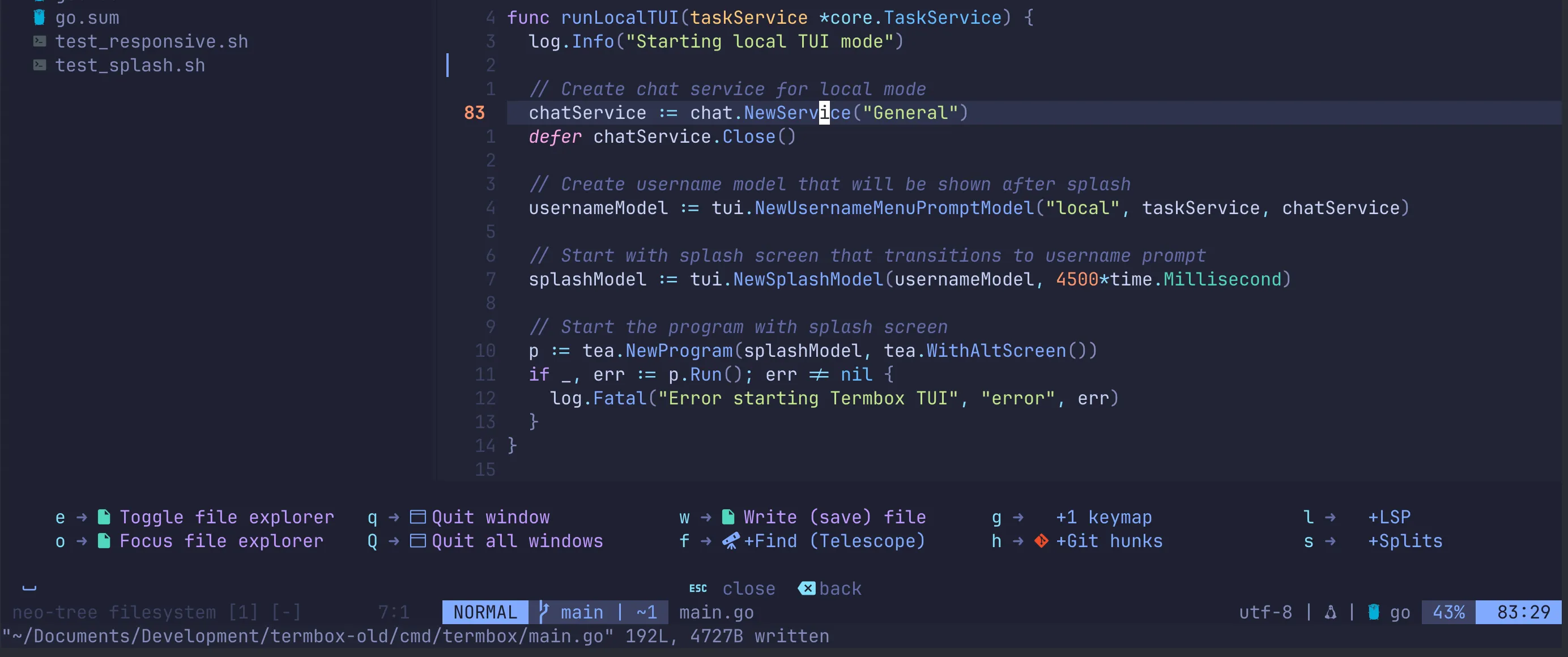
Way back in Part 2 I made a rule: every keymap gets a desc. It felt like busywork. This is the payoff. which-key reads those descriptions and, when I press <leader> and pause, pops up a menu of everything available, grouped and labelled:
require("which-key").add({
  { "<leader>f", group = "Find (Telescope)" },
  { "<leader>h", group = "Git hunks" },
  { "<leader>l", group = "LSP" },
  { "<leader>s", group = "Splits" },
})
I no longer have to remember my mappings. I press Space and the editor reminds me. For someone still building Vim muscle memory, this is enormous: it turns “what was that keybinding again?” into a non-question.
The number that settled the argument
When I started this, the loudest objection to skipping a plugin manager was this: lazy.nvim lazy-loads your plugins, so without it your startup will crawl. I loaded all eleven of my plugins eagerly, no lazy-loading at all, and timed a cold start:
nvim --headless +q → 0.067s67 milliseconds. For the entire config: options, keymaps, treesitter, native LSP, completion, and five quality-of-life plugins, all loaded up front. I can’t perceive it. The lazy-loading I “gave up” was solving a problem I don’t have at this scale. If I one day install eighty plugins, I’ll revisit. But for a real, complete, daily-driver config, the purist path cost me nothing measurable.
Looking back at seven parts
I deleted my Neovim config because I couldn’t explain it. Seven posts later, I can explain every single line, because I wrote every single line. Here’s what the rebuild taught me, beyond Neovim:
- A plugin is just a git repo. A plugin manager is
git clonewith a lockfile. Once I saw that (Part 3), the magic evaporated and the confidence arrived. - The “modern” thing has a bill, always. Native LSP was gloriously simple (Part 5). The treesitter rewrite needed a CLI nobody mentions (Part 4). blink’s docs described an unreleased version (Part 6). Every modern choice came with a gotcha, and writing each one down means it won’t ambush me on the next machine.
- Understanding beats configuring. I don’t have the fanciest config on the internet. I have one where, when it breaks, I know exactly where to look. That was the whole point.
The full thing is in my dotfiles, lockfile and all, set up on a new machine with one script. If you’ve been copy-pasting someone’s 2,000-line config and quietly hoping it keeps working, I can’t recommend the from-scratch route enough. It’s a weekend. You come out the other side actually understanding the tool you live in.
That’s the series. Thanks for following along. And a proper thank-you to my good friend, the one and only Sam, who talked me into the from-scratch route in the first place and kept nudging when I wavered. Turns out he was right.
Cheers!
Comments
Comments require a GitHub account. No GitHub? Reply on Substack or email me.