Neovim from scratch / part 5
Rebuilding my Neovim config from scratch (Part 5: An IDE in 60 lines, no LSP plugins)
Wiring up go-to-definition, hover docs, rename, and live diagnostics in Neovim using the native vim.lsp API in 0.11+: gopls, clangd, lua_ls, and not a single LSP plugin.
(Part 5 of rebuilding my Neovim config from zero on 0.12, no plugin manager, understanding every line. Earlier parts: options, keymaps, vim.pack, treesitter.)
This is the one I’d been quietly dreading. LSP, the Language Server Protocol, is the feature that turns a text editor into something IDE-shaped: go-to-definition, hover docs, rename-across-project, autocomplete, red squiggles under your mistakes. For years, setting it up in Neovim meant a small pile of plugins (nvim-lspconfig, mason, glue code) and a config incantation I copied without understanding.
Plot twist: on Neovim 0.11+, I deleted all of that, and it got easier.
What an LSP server actually is
Quick mental model, because this confused me forever. The “language smarts” don’t live in your editor. They live in a separate program, a language server, that you install per language:
- Go →
gopls - C/C++ →
clangd - Lua →
lua-language-server
Your editor launches that program in the background and chats with it over a standard protocol: “user’s cursor is here, what’s the definition?” / “they renamed this symbol, here are all 14 places to change.” The editor is a dumb-ish frontend. The server is the brain. That’s why the same servers power VS Code, Neovim, Zed, whatever: they all speak the same protocol.
So “setting up LSP” is really two jobs: install the servers, and tell Neovim how to launch and attach them.
The modern part: Neovim does the second job natively now
Neovim 0.11 added a built-in API, so the plugin layer just… evaporates. Two functions:
vim.lsp.config(name, cfg): describe how to start a server and when to attach itvim.lsp.enable({names}): turn them on, and Neovim auto-attaches when you open a matching file
That’s it. Here’s my entire server setup (lua/dilee/lsp/init.lua, note it’s not under my plugins folder, because there’s no plugin involved):
-- shared defaults merged into every server
vim.lsp.config("*", { root_markers = { ".git" } })

vim.lsp.config("gopls", {
  cmd = { "gopls" },
  filetypes = { "go", "gomod", "gowork", "gotmpl" },
  root_markers = { "go.work", "go.mod", ".git" },
  settings = { gopls = { analyses = { unusedparams = true }, staticcheck = true } },
})

vim.lsp.config("clangd", {
  cmd = { "clangd" },
  filetypes = { "c", "cpp", "objc", "objcpp" },
  root_markers = { "compile_commands.json", ".clangd", ".git" },
})

vim.lsp.config("lua_ls", {
  cmd = { "lua-language-server" },
  filetypes = { "lua" },
  root_markers = { ".luarc.json", ".git" },
  settings = {
    Lua = {
      runtime = { version = "LuaJIT" },
      diagnostics = { globals = { "vim" } },             -- `vim` is real in here
      workspace = { library = vim.api.nvim_get_runtime_file("", true) },
    },
  },
})

vim.lsp.enable({ "gopls", "clangd", "lua_ls" })
Each config is the same four ideas: cmd (how to launch it, and the binary has to be on your PATH), filetypes (when to attach), root_markers (how to find the project root, which becomes the server’s workspace), and settings (server-specific knobs).
The lua_ls block has a little self-referential magic I love: those settings teach the Lua server about Neovim’s own runtime, so when I’m editing this config I get autocomplete on vim.lsp.config and no phony “undefined global vim” warnings. The editor helping me write the editor.
Neovim already mapped the keys for me
Here’s what sold me on the native approach. The moment a server attaches, 0.11 sets up a pile of keymaps automatically. I didn’t write any of these:
K: hover documentationgrn: renamegra: code actiongrr: referencesgri: implementationgO: document symbolsCTRL-]: go to definition[d/]d: jump to previous / next diagnostic
So I only added the handful of comfort maps I personally wanted, and only in buffers where a server is attached:
vim.api.nvim_create_autocmd("LspAttach", {
  callback = function(ev)
    local function map(k, fn, d)
      vim.keymap.set("n", k, fn, { buffer = ev.buf, desc = "LSP: " .. d })
    end
    map("gd", vim.lsp.buf.definition, "Go to definition")
    map("gD", vim.lsp.buf.declaration, "Go to declaration")
    map("<leader>ld", vim.diagnostic.open_float, "Show diagnostic float")
    map("<leader>lf", function() vim.lsp.buf.format({ async = true }) end, "Format")
  end,
})
And one line so my mistakes show up inline instead of hiding:
vim.diagnostic.config({ virtual_text = true, severity_sort = true, float = { border = "rounded" } })Installing the actual servers
The only “work” was getting the three binaries. clangd shipped with my Xcode command-line tools already. The other two:
go install golang.org/x/tools/gopls@latest        # -> ~/go/bin/gopls
brew install lua-language-server                  # -> /opt/homebrew/bin
One thing to file away: gopls lands in ~/go/bin, which has to be on your PATH for Neovim to launch it. Mine already was, but on a brand-new machine that’s a thing to remember. It’s going on my install-script checklist, next to the tree-sitter CLI from Part 4.
The proof
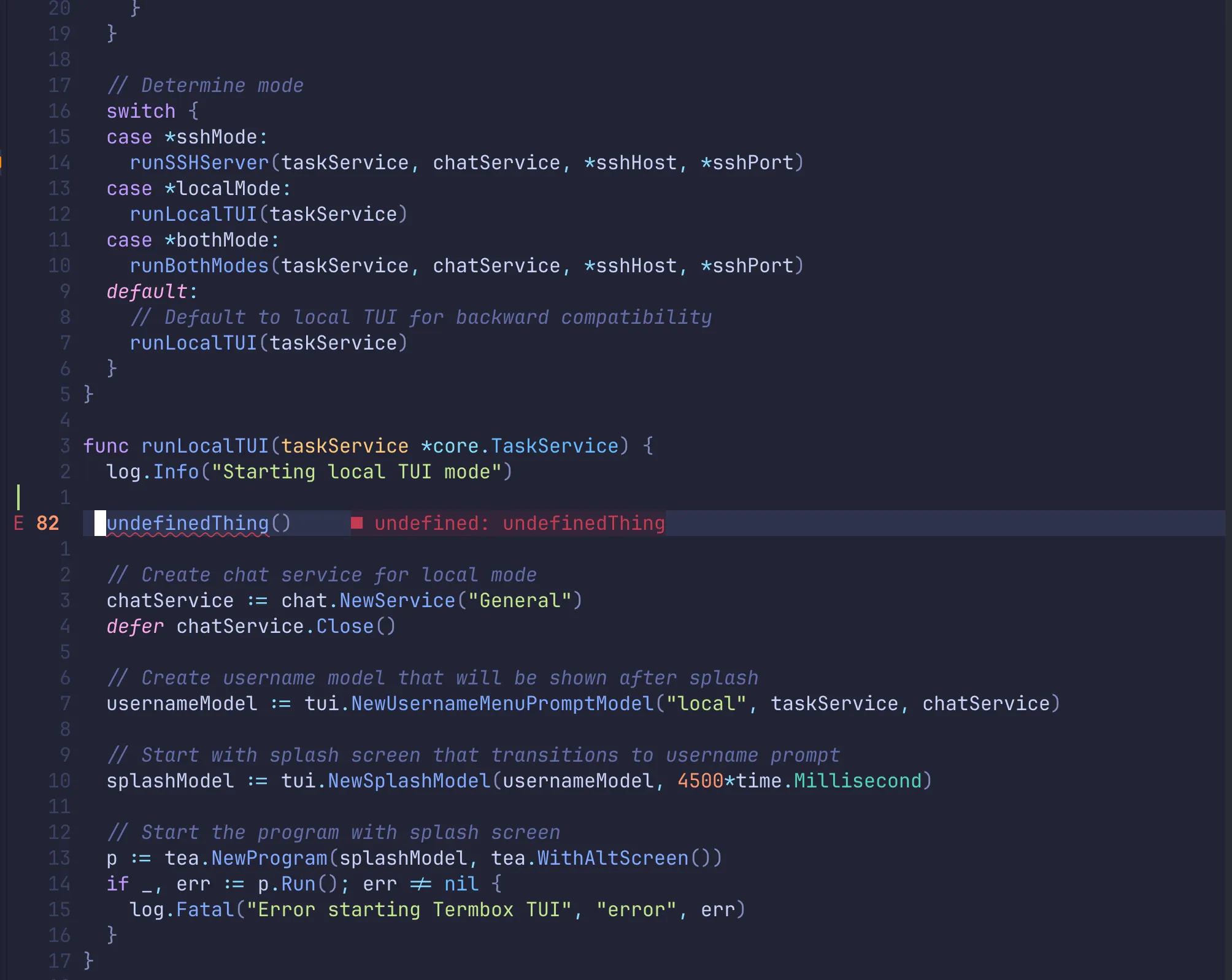
Dropped a deliberate typo into a Go file, a call to a function that doesn’t exist, and there it was, the full round trip working:
ERROR -> undefined: undefinedThinggopls parsed my code, found the problem, and Neovim painted it inline. Hover, rename, go-to-def, references: all live, across Go, C, and Lua.
The takeaway
For years I believed LSP setup was inherently fiddly and plugin-heavy. It just… isn’t anymore. The native API is maybe sixty lines for three languages, and most of that is settings I chose, not boilerplate I cargo-culted. The thing I’d dreaded turned out to be the most satisfying layer yet, because for once I can read every line and say exactly what it does.
Next: completion, the popup menu that suggests as you type. The servers we just wired up already know the answers (CTRL-X CTRL-O triggers Neovim’s built-in completion against them right now). Next time I make it automatic and pretty.
Cheers!
Comments
Comments require a GitHub account. No GitHub? Reply on Substack or email me.